Jenni AI review:
the complete verdict (2026)
We tested Jenni AI on a real paragraph: real citations, a Review tool that flags overstatements, and a reference list locked on the free plan. From $12/mo.
Published on April 17, 2026
- Citations that point to real papers: both references Jenni inserted in our test existed, with correct authors, journal and DOI
- Built-in Review (Claim confidence) caught overstated and unsupported claims and proposed better-matching sources
- Extra checks for peer-review-style feedback and source quality (retractions, preprints)
- Free plan with no credit card required
- 10,000+ citation styles, per Jenni
- Not a grammar checker: none of our 12 deliberate mistakes was flagged
- Suggested sentences can overstate their sources until you run Review
- Free plan: reference list locked (view, copy, export)
- Month-to-month pricing is about 2.5x the annual rate
How we scored Jenni AI
The score comes only from our own tests (November 11 and 14, 2026). Each criterion is scored out of 10 from a measured result, then weighted by how much it matters for academic work. We use the same grid for every tool we test.
Citation accuracyweight 25%
10/10
Result: 2 of 2 references Jenni inserted were real papers, with correct authors, journal, year and DOI. A small sample: two citations from one test paragraph.
How it's scored: Share of the references the tool inserted that exist, with correct authors, journal, year and DOI (checked in Crossref and OpenAlex).
Faithfulness to sourcesweight 20%
2.5/10
Result: One citation overstated its source (a single survey of 337 Australian students became "Australian and international student samples") and the other did not support the claim it was attached to: 0.5 of 2 points.
How it's scored: Does each generated sentence say what its source says? Supported = 1 point, overstated = 0.5, not supported = 0, scaled to 10.
Checking toolsweight 20%
8/10
Result: The Claim confidence review flagged all 4 problems we had found by hand, but missed the invented "(Smith, 2021)" citation: 4 of 5.
How it's scored: Share of the problems in our test text that the tool's own checks flagged: the issues we found by hand, plus one invented citation we planted.
Grammar and proofreadingweight 15%
0/10
Result: 0 of 12 deliberate mistakes flagged or fixed. Jenni does not proofread your text.
How it's scored: Share of the 12 deliberate grammar mistakes in our test paragraph that the tool flagged or fixed.
Long documents and exportweight 10%
6/10
Result: 3 of 5 checks passed: after we moved a chart, captions were renumbered, in-text references updated and links kept in the Word file. But the numbers became plain text in Word, and the charts became images.
How it's scored: Share of our checks passed on a test document: numbering after reordering, references updated, links, numbering still live in Word, editable charts.
Free plan and priceweight 10%
5/10
Result: 2 of 4: free plan with no card (yes); a full paper with a bibliography on the free plan (no, the reference list is locked); Plus at $12 a month billed yearly (yes); month-to-month price at most 1.5 times the annual one (no, about 2.5 times).
How it's scored: Four yes/no checks: free plan without a card, a full paper with bibliography possible for free, cheapest paid plan at $15 a month or less, monthly price at most 1.5 times the annual one.
Overall score (weighted average)
5.7/10
Not tested, so not scored: PDF uploads and the AI chat; LaTeX export; how Jenni stores your documents.
Pricing & Plans
Which plan should you choose? Our recommendation based on your usage.
Free
- 10 AI autocompletes per day
- 10 PDF uploads
- 3 AI edits
- 5 AI chat messages
- 3 reviews
- 3 workflow runs
- In-text citations, 10,000+ styles
- Reference list export requires a paid plan
Plus
- 5,000 AI autocompletes per month
- Unlimited PDF uploads
- 500 AI edits per month
- 500 AI chat messages per month
- 10 reviews per month
- 10 workflow runs
- Full document export
- Live chat support
Pro
- Unlimited AI autocomplete
- Unlimited PDF uploads
- Unlimited AI edits
- Unlimited AI chat
- Unlimited reviews
- Unlimited workflow runs
- Full document export
- Priority support
Our detailed review
Disclosure: DigitSelect earns a commission if you subscribe to Jenni AI through our links. It doesn't change what we report below: every result on this page comes from our own test or from Jenni's public pricing page.
Our verdict
Jenni AI is a writing assistant built for academic papers, not a grammar checker. In our test, the citations it suggested pointed to real, correctly referenced papers, and its built-in Review tool caught the places where its own sentences overstated those papers. That combination is its real strength. Its limits: it ignored 12 deliberate grammar mistakes, it did not flag a fake citation we typed ourselves, and on the free plan the reference list is locked behind an upgrade.
Best for: students and researchers who draft from sources and want help finding and checking citations. Not for: anyone looking for proofreading, or for a tool that writes the paper for them.
How we tested Jenni AI
On November 11, 2026, we opened a free Jenni AI account and pasted the same 76-word academic paragraph we use for every writing tool. It contains 12 deliberate errors (subject-verb agreement, a missing possessive, word order, "there" instead of "their") and one invented citation, "(Smith, 2021)". We then:
- let Jenni's autocomplete continue the paragraph and accepted two of its suggestions;
- checked every reference it inserted against the public Crossref and OpenAlex databases;
- ran Jenni's Review → Claim confidence check on the result.
This is one test on one paragraph, not a lab benchmark. We did not test PDF uploads or the AI chat. We tested figure and table cross-references and the Word export separately on November 14, 2026 (see Result 5).
Result 1: the citations were real
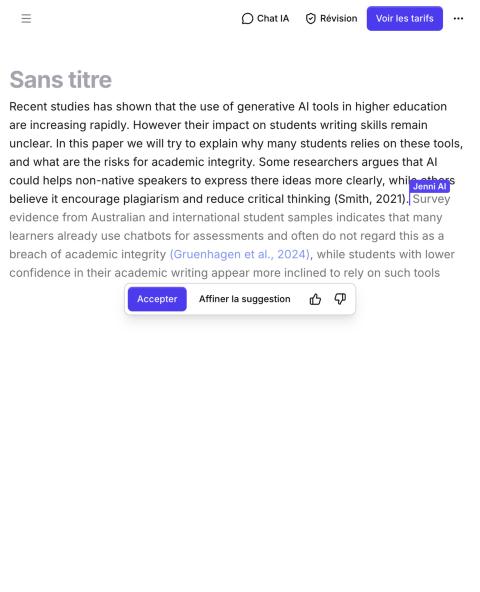
Jenni continued our paragraph with two sentences, each with a citation:
- Gruenhagen et al. (2024), Computers and Education: Artificial Intelligence, vol. 7, 100273;
- Chanpradit (2025), Edelweiss Applied Science and Technology, 9(4), 889–906.
Both papers exist, and authors, journal, year and DOI were all correct. No invented references.
Result 2: the sentences sometimes said more than the sources
Real does not mean accurate. Jenni wrote that "Australian and international student samples" showed that "many learners" use chatbots for assessments. The paper's abstract describes a single survey of 337 Australian university students, of whom "more than a third" had used a chatbot. The second citation, a general literature review, did not support the specific claim it was attached to.
Result 3: Jenni's Review caught its own overstatements
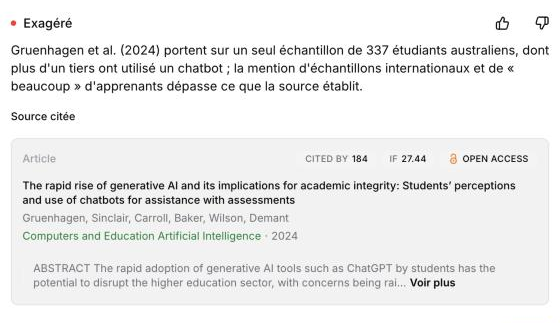
The Claim confidence review took about 17 seconds and returned four issues: one claim with no source, one "overstated" citation (the Australian survey), one unsupported claim and one "misrepresented" source. For each, it proposed a better-matching paper and a corrected sentence. These were the same problems we found by hand.
What it missed: our invented "(Smith, 2021)" citation. It is not in the reference list, yet the review did not flag it. If you paste text from elsewhere, check those citations yourself.
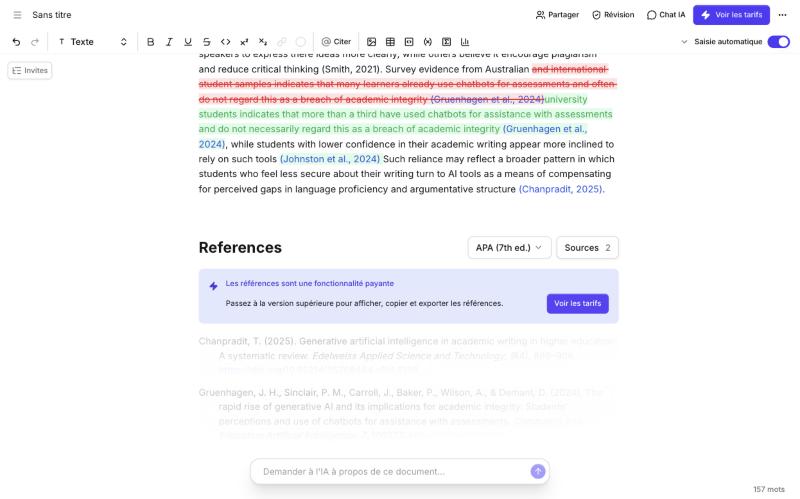
Result 4: no grammar correction
None of the 12 deliberate mistakes was underlined or corrected. Jenni continues and sources your text; it does not proofread it. Plan to run a separate proofreading pass before you submit.
Result 5: figure and table numbers update in Jenni, then freeze in Word
In October 2026, Jenni added numbered captions and cross-references for figures and tables. We tested them on November 14 with a short document: two charts, one table and a sentence pointing to all three, inserted by typing /ref.
Then we dragged the second chart above the first. Jenni renumbered both captions at once, and the sentence updated by itself: "Figure 1" became "Figure 2", and the other way round. The table reference stayed "Table 1", as it should.
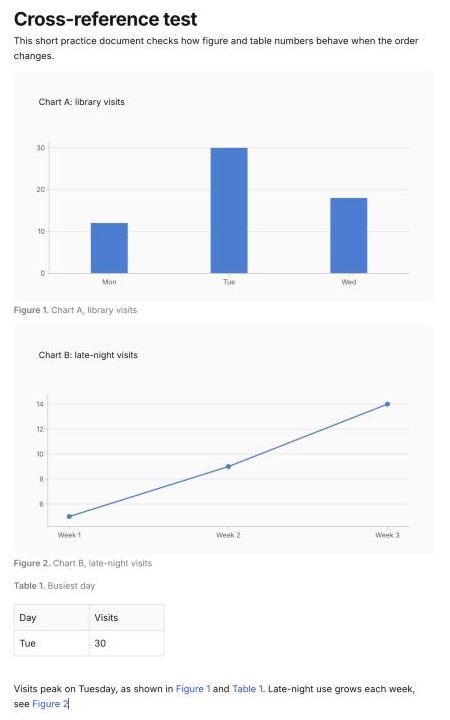
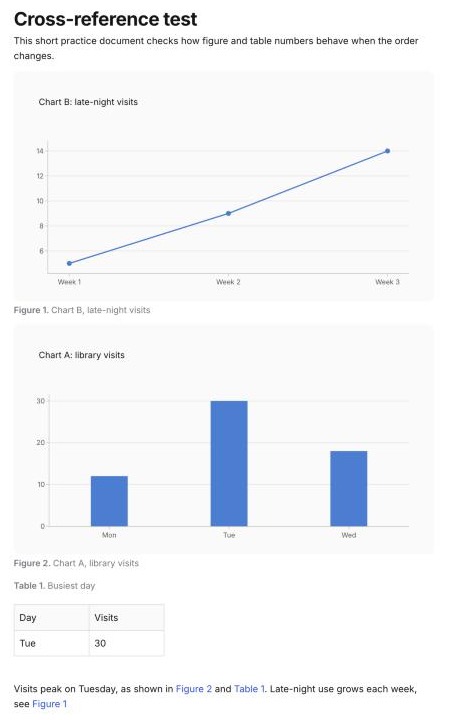
The Word export kept the right numbers, but not the automation. We exported the document to Word (.docx) on the free plan and opened the file in LibreOffice. Every caption and reference had the correct number, and each reference linked to the right figure or table. But the numbers were plain text, not Word fields. If you move a figure after exporting, Word will not renumber anything. The charts also became images.
What this means: do your reordering in Jenni, and export once the structure is final. If your thesis will be finished in Word, plan to renumber by hand or rebuild the captions with Word's own tools.
Limits of this test: one short document, the Word export only (we did not test LaTeX), and we checked the exported file in LibreOffice, not in Microsoft Word.
Jenni AI for free: what you really get
Jenni's pricing page lists the free plan with 10 AI autocompletes per day, 10 PDF uploads, 3 AI edits, 5 AI chat messages, 3 reviews and "unlimited citations". In the editor, in-text citations are indeed inserted, but the reference list at the end of the document shows: "References are a paid feature. Upgrade to view, copy and export references." Jenni's own comparison table, checked again on November 17, 2026, matches what we saw: on the free plan, document export covers the "body content only". The free plan is enough to try the autocomplete and one or two reviews, not to finish a paper with a bibliography.
How much Jenni AI costs: monthly vs annual
Jenni AI has a free plan. Plus costs $12 a month and Pro $29 a month when billed annually, or $30 and $73 if you pay month to month. Prices in USD, checked on jenni.ai/pricing on November 17, 2026.
| Free | Plus | Pro | |
|---|---|---|---|
| Month-to-month | $0 | $30 | $73 |
| Annual (per month, billed yearly) | $0 | $12 | $29 |
| AI autocompletes | 10 per day | 5,000 per month | Unlimited |
| AI edits | 3 | 500 per month | Unlimited |
| AI chat messages | 5 | 500 per month | Unlimited |
| Reviews | 3 | 10 per month | Unlimited |
| Workflow runs | 3 | 10 | Unlimited |
| PDF uploads | 10 (up to 25 MB, 150 pages each) | Unlimited (100 MB, 500 pages) | Unlimited (100 MB, 1,000 pages) |
| Document export | Body content only: the reference list was locked in our test | Full document | Full document |
| Support | Limited | Live chat | Priority |
The month-to-month price is about 2.5 times the annual one. If you only need Jenni for one semester, compare the two totals before paying. Jenni shows local prices in the app: from France, we saw prices in euros with a "20% local discount" banner.
Cancelling and refunds. Jenni's pricing page says you can cancel anytime, and no credit card is needed for the free plan. Its refund policy adds that subscriptions renew automatically until you cancel (Billing, then Cancel Subscription), and that payments are generally not refundable. A refund is only considered for a bug in the product, after a call with Jenni's support. Test the free plan before you pay for a full year.
Academic integrity
Jenni presents itself as a tool that writes with you, not for you, and its Review features push in that direction. Keep your drafts and your sources, check every citation, and follow your university's AI policy. No tool, Jenni included, can guarantee how an AI detector will score your text.
Key Features
The features that set this product apart from the competition.
Autocomplete with citations
Continues your paragraph and inserts in-text citations to published papers. In our test, both references were real.
Claim confidence review
Flags uncited, overstated or misrepresented claims and proposes better-matching sources. Took about 17 seconds on our paragraph.
Peer review simulation
Simulates feedback from expert reviewers on your document. Seen in the app, not tested.
Source quality check
Checks your citations for retractions, preprints and other quality issues, per Jenni. Not tested.
AI chat and PDF uploads
Ask questions about your document and uploaded PDFs, per Jenni. Not tested.
10,000+ citation styles
APA, MLA, Chicago, Harvard and journal styles, per Jenni. Our test used APA 7th edition.
Frequently Asked Questions
Try Jenni AI Free — Zero Risk
Prices and conditions can change: check the current offer on the official site.